Very large

The idea of extremely large is constantly shifting, evolving. As time passes by we quickly adopt its new numeric definition and only rarely, with a mild sense of amusement, recall the old one.

Take, for instance, aistore – an open-source storage cluster that deploys ad-hoc and runs anywhere. Possibly because of its innate scalability (proportional to the number of data drives) the associated “largeness” is often interpreted as total throughput. The throughput of something like this particular installation:
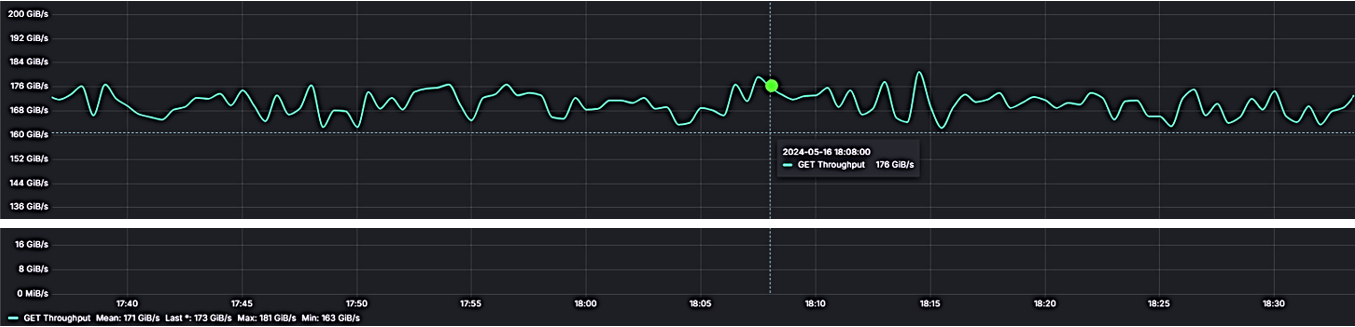
where 16 gateways and 16 DenseIO.E5 storage nodes provide a total sustained 167 GiB/s.

But no, not that kind of “large” we’ll be talking about – a different one. In fact, to demonstrate the distinction I’ll be using my development Precision 5760 (Ubuntu 22, kernel 6.5.0) and running the most minimalistic setup one can only fathom:

a single v3.23.rc4 AIS node on a single SK Hynix 1TB NVMe, with home Wi-Fi (and related magic) to connect to Amazon S3

and that’s it.

When training on a large dataset

Numbers do matter. Google Scholar search for large-scale training datasets returns 3+ million results (and counting). Citing one of those, we find out that, in part:

Language datasets have grown “exponentially by more than 50% per year”, while the growth of image datasets “seems likely to be around 18% to 31% per year <…>

Growth rate notwithstanding, here’s one unavoidable fact: names come first. Training on any dataset, large or small, always begins with finding out the names of contained objects, and then running multiple epochs, whereby each epoch entails computing over a random permutation of the entire dataset – the permutation that, in turn, consists of a great number of properly shuffled groups of object names called batches, etc. etc.

Back to finding out the names though – the step usually referred to as listing objects. The question is: how many. And how long will it take…

What’s in a 10 million names

In the beginning, our newly minted single-node cluster is completely empty – no surprises:

$ ais ls
No buckets in the cluster. Use '--all' option to list matching remote buckets, if any.

But since in aistore accessibility automatically means availability

achieving this equivalency for training (or any other data processing purposes) is a bit tricky and may entail (behind the scenes) synchronizing cluster-level metadata as part of a vanilla read or write operation

– we go ahead to find out what’s currently accessible:

$ ais ls --all
NAME          PRESENT
s3://ais-10M  no
...

Next, we select one bucket (with a promising name) and check it out:

$ ais ls s3://ais-10M --cached --count-only
Listed: 0 names (elapsed 1.27355ms)

Empty bucket it is, aistore wise. What it means is that we’ll be running one exclusively-remote list-objects, with no object metadata coming from the cluster itself.

There’s a balancing act between the need to populate list-objects results with in-cluster metadata, on the one hand, and the motivation not to run N identical requests to remote backend. When aistore has N=1000 nodes, there’ll be still a single randomly chosen target that does the remote call and shares the results with the rest 999.

Listing 10M objects with and without inventory

Frankly, since I already know that top-to-bottom listing of the entire 10-million bucket will require great dedication (and even greater patience), I’ll just go ahead and limit the operation to the first 100K names (that is, 100 next-page requests):

$ for i in {1..10}; do ais ls s3://ais-10M --limit 100_000 --count-only; done

1: 100,000 names in 18.2s
2: 100,000 names in 20.4s
3: 100,000 names in 20.1s
...

And now, for comparison, the same experiments with the new v3.23 feature called bucket inventory. Except that this time – no excuses: we name every single object in the entire 10M dataset (the names are not shown):

$ for i in {1..10}; do ais ls s3://ais-10M --inventory --count-only; done

1. 10,900,489 names in 1m57s
2. 10,900,489 names in 22.94s
3. 10,900,489 names in 22.7s
...

In conclusion – and discounting the first run whereby aistore takes time to update its in-cluster inventory (upon checking its remote existence and last-modified status) – the difference in resulting latency is, roughly, 94 times.

BLOBs

Moving on: from large datasets – to large individual objects. The same persistent question remains: what would be the minimal size that any reasonably unbiased person would recognize as “large”?

Today, the answer will likely fall somewhere in the (1GB, 1PB) range. Further, given some anecdotal evidence – for instance, the fact that Amazon S3 object cannot exceed the “maximum of 5 TB” – we can maybe refine the range accordingly. But it’ll be difficult to narrow it down to, say, one order of magnitude.

A bit of Internet trivia: 1997 USENIX report estimated distribution file types and sizes, with sizes greater than 1MB ostensibly not present at all (or, at least, not discernable in the depicted diagram). And in the year 2000 IBM was publishing special guidelines to overcome 2GB file size limitation.

What I’m going to do now is simply postulate that 1GiB is big enough for at-home experiments

$ ais ls s3://ais-10M --prefix large
NAME      SIZE      CACHED
largeobj  1.00GiB   no

– and immediately proceed to run the second pair of micro-benchmarks:

## GET (and immediately evict) a large object
$ for i in {1..10}; do ais get s3://ais-10M/largeobj /dev/null; ais evict s3://ais-10M/largeobj; done
1. 27.4s
2. 27.3s
3. 28.1s
...

versus:

## GET the same object via blob downloader
$ for i in {1..10}; do ais get s3://ais-10M/largeobj /dev/null --blob-download; ais evict s3://ais-10M/largeobj; done
1. 17.4s
2. 16.9s
3. 18.1s
...

The associated capability is called blob downloading – reading large remote content in fixed-size chunks, in parallel. The feature is available in several different ways, including the most basic RESTful GET (above).

Next steps

Given that “large” only gets bigger, more needs to be done. More can be done as well, including both inventory (that can be provided across all remote aistore-supported backends and managed at finer-grained intervals and/or upon events), and blobs (that should be able to leverage the upcoming chunk-friendly content layout). And more.
AIS on NFS

It has long been said that aistore (AIS) scales linearly with no limitation, with combined throughput increasing as (N+1)/N, where N and N+1 are, respectively, the total number of clustered disks before and after.

In other words, the system is a universal aggregator of Linux machines (of any kind) that have disks (of any kind). That‘s been the definition and state of the art for a long time.

Tempora mutantur, however – The times change, and so do we. AIS will now aggregate not only disks (or, not just disks) but also directories. Any file directories – assuming, of course, they are not nested. Any number of regular file directories that, ostensibly, may not even have underlying block devices.

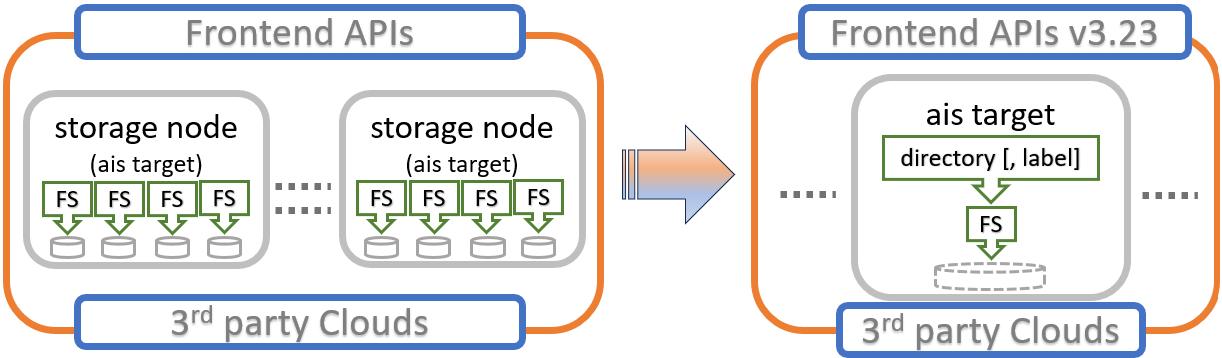
Here’s what has happened:

This is an AIS cluster sandwiched between two interfaces often referred to as frontend and backend. Cluster provides the former (which inevitably entails S3 but not only), and utilizes the latter to perform fast-tiering function across vendors and solutions.

TL;DR

Long story short, the upcoming v3.23 removes the requirement that every aistore mountpath is a separate filesystem (“FS” above) that owns a block device. In the past, this block device would have to present itself at a node’s startup and wouldn’t be permitted to be used by (or shared with) any other mountpath.

Not anymore, though. Planned for late April or May 2024, the release will introduce a separate indirection called “mountpath label.”

Speaking of which. AIS mountpath, admittedly not yet a household name, goes way back. In fact, it goes all the way back – the abstraction shows up in one of the very first commits circa 2017. Tempora mutantur …

To have more control

The original motivation was the usual one that drives most software abstractions – to have more control. Control, as it were, over the two most basic aspects of storage clustering:

  • content distribution (which better be balanced across storage devices), and
  • execution parallelism that must scale proportionally with each added device.

And so, that’s how it was done and then remained. For a very long time, actually.

  • 1 mountpath root
  • 1 filesystem
  • 1 undivided block device – ideally, a local HDD or SSD. Or, at the very least, a hardware RAID.

Needless to say, this 1-1-1 schema had a lot going for it. It still does. Simplicity, symmetry, elegance – you name it. But there’s one little problem: it’s limiting, deployment-wise. How do you deploy an aistore when all you have is a remote file share?

Yes, I know – it’s loopback. But that’s not a good answer. It’s a last-resort type answer. It’s a last-ditch-effort-when-all-hope-is-gone type of compromise, and that’s unfortunate.

Hence, v3.23. When it gets released, aistore will deploy on pretty much anything. On Lustre, for instance.

The simplified diagram depicts Lustre-based and labeled mountpaths that appear to be diskless. Indeed, lsblk would show nothing (relevant, that is); df, on the other hand, will show something:

There’s also the stuff this particular diagram doesn’t show:

  • multiple AIS gateways providing independent access points;
  • storage nodes a.k.a. targets that possibly have multiple (multihoming) interfaces to facilitate throughput;
  • Lustre servers on the other side of the Top-of-Rack switch…

And more. Because the point is different: there are no disks. Instead, there are labels, presumably indicating different NFS endpoints: “lustre1”, “lustre2”, and so on.

What’s in a label

So, what’s the motivation behind “mountpath labels”? In the end, it’s the ability to deliver functionality across individual configurable buckets. Orthogonal to the buckets, if you will.

More precisely:

Full disclosure: out of the 5-items list (above), the number 2 (storage class) and number 3 (parallelism multiplier) are not done, and whether any of it will be done, and how soon – is not clear yet.

However. An empty or missing label is fine. Still recommended for production deployments. No-label simply means that the aistore itself will resolve the device, ensure non-sharing, keep reporting the device’s statistics (via Prometheus/Grafana and logs), and use those statistics for read load-balancing at runtime.

What’s next

Maybe a class of storage? It’s a cool feature. After all, Amazon has 11 of those and counting.

But for a product like aistore, the immediate question would be – Why? The software deploys ad-hoc on arbitrary Linux machines with no limitations. Further, it populates itself on demand (upon the first epoch) and/or upon request, in any of the multiple supported ways.

Why would you then have one heterogeneous cluster instead of having, say, two separate clusters that self-populate from remote data sources and see each other’s datasets in one combined global namespace (of all datasets) – one dedicated cluster for each “storage class”?

That is the question.

Transforming non-existing datasets


There’s an old trick that never quite gets old: you run a high-velocity exercise that generates a massive amount of traffic through some sort of a multi-part system, whereby some of those parts are (spectacularly) getting killed and periodically recovered.

TL;DR a simple demonstration that does exactly that (and see detailed comments inside):

ScriptAction
cp-rmnode-rebalancetaking a random node to maintenance when there’s no data redundancy
cp-rmnode-ec(erasure coded content) + (immediate loss of a node)
cp-rmdisk(3-way replication) + (immediate loss of a random drive)

The scripts are self-contained and will run with any aistore instance that has at least 5 nodes, each with 3+ disks.

But when the traffic is running and the parts are getting periodically killed and recovered in a variety of realistic ways – then you would maybe want to watch it via Prometheus or Graphite/Grafana. Or, at the very least, via ais show performance – the poor man’s choice that’s always available.

for details, run: ais show performance --help

Observability notwithstanding, the idea is always the same – to see whether the combined throughput dips at any point (it does). And by how much, how long (it depends).

There’s one (and only one) problem though: vanilla copying may sound dull and mundane. Frankly, it is totally unexciting, even when coincided with all the rebalancing/rebuilding runtime drama behind the scenes.

Copy

And so, to make it marginally more interesting – but also to increase usability – we go ahead and copy a non-existing dataset. Something like:

$ ais ls s3
No "s3://" matching buckets in the cluster. Use '--all' option to list _all_ buckets.

$ ais storage summary s3://src --all
NAME             OBJECTS (cached, remote)
s3://src                  0       1430

$ ais ls gs
No "gs://" matching buckets in the cluster. Use '--all' option to list _all_ buckets.

$ ais cp s3://src gs://dst --progress --refresh 3 --all

Copied objects:              277/1430 [===========>--------------------------------------------------] 19 %
Copied size:    277.00 KiB / 1.40 MiB [===========>--------------------------------------------------] 19 %

The first three commands briefly establish non-existence – the fact that there are no Amazon and Google buckets in the cluster right now.

ais storage summary command (and its close relative ais ls --summary) will also report whether the source is visible/accessible and will conveniently compute numbers and sizes (not shown).

But because “existence” may come with all sorts of connotations the term is: presence. We say “present” or “not present” in reference to remote buckets and/or data in those buckets, whereby the latter may or may not be currently present in part or in whole.

In this case, both the source and the destination (s3://src and gs://dst, respectively) were ostensibly not present, and we just went ahead to run the copy with a progress bar and a variety of not shown list/range/prefix selections and options (see --help for details).

Transform

From here on, the immediate and fully expected question is: transformation. Namely – whether it’d be possible to transform datasets – not just copy but also apply a user-defined transformation to the source that may be (currently) stored in the AIS cluster, or maybe not or not entirely.

Something like:

$ ais etl init spec --name=my-custom-transform --from-file=my-custom-transform.yaml

followed by:

$ ais etl bucket my-custom-transform s3://src gs://dst --progress --refresh 3 --all

The first step deploys user containers on each clustered node. More precisely, the init-spec API call is broadcast to all target nodes; in response, each node calls K8s API to pull the corresponding image and run it locally and in parallel – but only if the container in question is not already previously deployed.

(And yes, ETL is the only aistore feature that does require Kubernetes.)

Another flavor of ais etl init command is ais etl init code – see --help for details.

That was the first step – the second is virtually identical to copying (see previous section). It’ll read remote dataset from Amazon S3, transform it, and place the result into another (e.g., Google) cloud.

As a quick aside, anything that aistore reads or writes remotely it also stores. Storing is always done in full accordance with the configured redundancy and other applicable bucket policies and – secondly – all subsequent access to the same content (that previously was remote) gets terminated inside the cluster.

Despite node and drive failures

The scripts above periodically fail and recover nodes and disks. But we could also go ahead and replace ais cp command with its ais etl counterpart – that is, replace dataset replication with dataset (offline) transformation, while leaving everything else intact.

We could do even more – select any startable job:

$ ais start <TAB-TAB>
prefetch           dsort              etl                cleanup            mirror             warm-up-metadata   move-bck
download           lru                rebalance          resilver           ec-encode          copy-bck

and run it while simultaneously taking out nodes and disks. It’ll run and, given enough redundancy in the system, it’ll recover and will keep going.

NOTE:

The ability to recover is much more fundamental than any specific job kind that’s already supported today or will be added in the future.

Not every job is startable. In fact, majority of the supported jobs have their own dedicated API and CLI, and there are still other jobs that run only on demand.

The Upshot

The beauty of copying is in the eye of the beholder. But personally, big part of it is that there’s no need to have a client. Not that clients are bad, I’m not saying that (in fact, the opposite may be true). But there’s a certain elegance and power in running self-contained jobs that are autonomously driven by the cluster and execute at (N * disk-bandwidth) aggregated throughput, where N is the total number of clustered disks.

At the core of it, there’s the (core) process whereby all nodes, in parallel, run reading and writing threads on a per (local) disk basis, each reading thread traversing local, or soon-to-be local, part of the source dataset. Whether it’d be vanilla copying or user-defined offline transformation on steroids, the underlying iterative picture is always the same:

  1. read the next object using a built-in (local or remote) or etl container-provided reader
  2. write it using built-in (local or remote), or container-provided writer
  3. repeat

Parallelism and autonomy always go hand in hand. In aistore, location rules are cluster-wide universal. Given identical (versioned, protected, and replicated) cluster map and its own disposition of local disks, each node independently decides what to read and where to write it. There’s no stepping-over, no duplication, and no conflicts.

Question to maybe take offline: how to do the “nexting” when the source is remote (i.e., not present)? How to iterate a remote source without loss of parallelism?

And so, even though it ultimately boils down to iteratively calling read and write primitives, the core process appears to be infinitely flexible in its applications.

And that’s the upshot.

References

AIStore: an open system for petascale deep learning

So tell me, what do you truly desire?

                  Lucifer Morningstar

Introduction

AIStore (or AIS) has been in development for more than three years so far and has accumulated a fairly long list of capabilities, all duly noted via release notes on the corresponding GitHub pages. At this stage, AIS meets common expectations to a storage solution – its usability, manageability, data protection, scalability and performance.

AIStore is a highly available partition-tolerant distributed system with n-way mirroring, erasure coding, and read-after-write consistency(*). But it is not purely – or not only – a storage system: it’ll shuffle user datasets and run custom extract-transform-load workloads. From its very inception, the idea was to provide an open-source, open-format software stack for AI apps – an ambitious undertaking that required incremental evolution via multiple internal releases and continuous refactoring…

AIS is lightweight, fully reliable storage that can be ad-hoc deployed, with or without Kubernetes, anywhere from a single Linux machine to a bare-metal cluster of any size. Prerequisites boil down to having a Linux and a disk. Getting started with AIS will take only a few minutes and can be done either by running a prebuilt all-in-one docker image or directly from the source.

AIS provides S3 and native APIs and can be deployed as fast storage (or a fast on-demand cache) in front of the 5 (five) supported backends (whereby AIS itself would be the number 6, respectively):

Review

The focus on training apps and associated workloads results in a different set of optimization priorities and a different set of inevitable tradeoffs. Unlike most distributed storage systems, AIS does not break objects into uniform pieces – blocks, chunks, or fragments – with the corresponding metadata manifests stored separately (and with an elaborate datapath to manage all of the above and reassemble distributed pieces within each read request, which is also why the resulting latency is usually bounded by the slowest link in the corresponding flow chart).

Instead, AIS supports direct (compute <=> disk) I/O flows with the further focus on (re)sharding datasets prior to any workload that actually must perform – model training in the first place. The idea was to make a system that can easily run massive-parallel jobs converting small original files and/or existing shards to preferred sharded formats that the apps in question can readily and optimally consume. The result – linear scalability under random-read workloads, as in:

total-throughput = N * single-disk-throughput

where N is the total number of clustered disks.

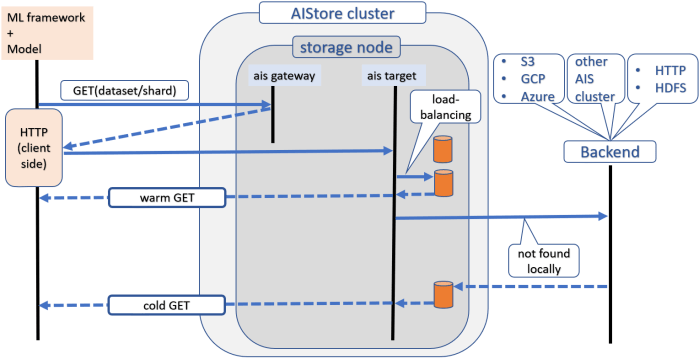
It is difficult to talk about a storage solution and not say a few words about actual I/O flows. Here’s a high-level READ diagram, which however does not show checksumming, self-healing, versioning, and scenarios (that also include operation in the presence of nodes and disks being added or removed):

Further

You can always start small. As long as there’s HTTP connectivity, AIS clusters can see and operate on each other’s datasets. One can, therefore, start with a single all-in-one container or a single (virtual) machine – one cluster, one deployment at a time. The resulting global namespace is easily extensible via Cloud buckets and other supported backends. Paraphrasing the epigraph, the true desire is to run on commodity Linux servers, perform close-to-data user-defined transforms, and, of course, radically simplify training models at any scale.

Integrated Storage Stack for Training, Inference, and Transformations

The Problem

In the end, the choice, like the majority of important choices, comes down to a binary: either this or that. Either you go to storage, or you don’t. Either you cache a dataset in question (and then try to operate on the cache), or make the storage itself do the “operating.”

That’s binary, and that’s the bottom line.

Of course, I’m talking about ETL workloads. Machine learning has three, and only three, distinct workloads that are known at the time of this writing. And ETL is the number one.

[ Full disclosure: the other two include model training and hyperparameter optimization ]

ETL – or you can simply say “data preprocessing” because that’s what it is (my advice, though, if I may, would be to say “ETL” as it may help institute a sense of shared values, etc.) – in short, ETL is something that is usually done prior to training.

Examples? Well, ask a random person to name a fruit, and you’ll promptly hear back “an apple.” Similarly, ask anyone to name an ETL workload, and many, maybe most, will immediately respond with “augmentation”. Which in and of itself is a shortcut for a bunch of concrete sprightly verbs: flip, rotate, scale, crop, and more.

My point? My point is, and always will be, that any model – and any deep-learning neural network, in particular – is only as good as the data you feed into it. That’s why they flip and rotate and what-not. And that’s precisely why they augment or, more specifically, extract-transform-load, raw datasets commonly used to train deep learning classifiers. Preprocess, train, and repeat. Reprocess, retrain, and compare the resulting mAP (for instance). And so on.

Moreover, deep-learning over large datasets features the proverbial 3 V’s, 4 V’s, and some will even say 5 V’s, of the Big Data. That’s a lot of V’s, by the way! Popular examples include YouTube-8M, YouTube-100M, and HowTo100M. Many more examples are also named here and here.

Very few companies can routinely compute over those (yes, extremely popular) datasets. In US, you can count them all on the fingers of one hand. They all use proprietary wherewithal. In other words, there’s a problem that exists, is singularly challenging and, for all intents and purposes, unresolved.

After all, a 100 million YouTube videos is a 100 million YouTube videos – you cannot bring them all over to your machine. You cannot easily replicate 100 million YouTube videos.

And finally – before you ask – about caching. The usual, well-respected and time-honored, approach to cache the most frequently (recently) used subset of a dataset won’t work. There’s no such thing as “the most” – every single image and every second of every single video is equally and randomly accessed by a model-in-training.

Which circles me all the way back to where I’d started: the choice. The answer at this point appears to be intuitive: storage system must operate in place and in parallel. In particular, it must run user-defined ETLs on (and by) the cluster itself.

AIS

AIStore (or AIS) is a reliable distributed storage solution that can be deployed on any commodity hardware, can run user containers and functions to transform datasets inline (on the fly) and offline, scales linearly with no limitations.

AIStore is not gen-purpose storage. Rather, it is a fully-reliable extremely-lightweight object store designed from the ground up to serve as a foundation for an integrated hyper-converged stack with a focus on deep learning.

In the 3+ years the system has been in development, it has accumulated a long list of features and capabilities, all duly noted via release notes on the corresponding GitHub pages. At this stage AIS meets most common expectations in re usability, manageability, and data protection.

AIS is an elastic cluster that grows and shrinks with no downtime and can be easily-and-quickly deployed, with or without Kubernetes, anywhere from a single machine to a bare-metal cluster of any size. For Kubernetes-based deployments, there’s a whole separate repository that contains AIS deployment playbooks, Helm charts, and Kubernetes Operator.

The system features data protection and self-healing capabilities that users come to normally expect nowadays. But it can also be used as fast ad-hoc cache in front of the five (so far) supported backends, with AIS itself being the number six.

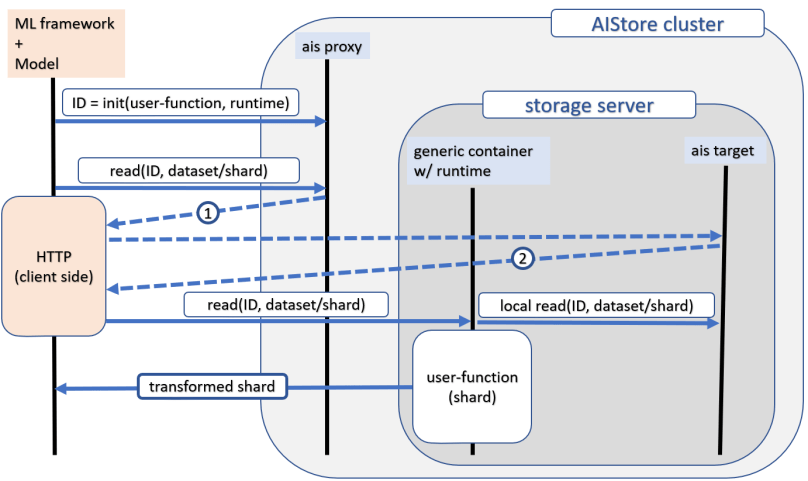
The picture below illustrates inline transformation, whereby each shard from a given distributed dataset gets transformed in-place by a user-provided function. It goes as follows:

  1. A user initiates custom transformation by executing documented REST APIs and providing either a docker image (that we can pull) or a transforming function that we further run using one of the pre-built runtimes;
  2. The API call triggers simultaneous deployment of multiple ETL containers (i.e., K8s pods) across the entire cluster: one container alongside each AIS target;
  3. Client-side application (e.g., PyTorch or TensorFlow-based training model) starts randomly reading sharded samples from a given dataset;
  4. Each read request:
    • quickly bounces off via HTTP redirect – first, of an AIS proxy (gateway) and, second, of AIS target – reaching its designated destination – the ETL container that happens to be “local” to the requested shard, after which:
    • the container performs local reading of the shard, applies user-provided transforming function to the latter, and, finally, responds inline to the original read request with the transformed bytes.

Supported

The sequence above is one of the many supported permutations that also include:

  • User-defined transformation via:
    • ETL container that runs HTTP server and implements one of the supported APIs, or
    • user function that we run ourselves given one of the supported runtimes;
  • AIS target <=> ETL container communication via:
    • HTTP redirect – as shown in the picture, or
    • AIS target performing the read and “pushing” read bytes into locally deployed ETL to further get back transformed bytes and respond to the original request.

And more. Offline – input dataset => output dataset – transformation is also available. A reverse-proxy option is supported as well, although not recommended.

Remark

In the end, the choice, like so many important choices we make, is binary. But it is good to know what can be done and what’s already actually working.

References

High performance I/O for large scale deep learning

Abstract – Training deep learning (DL) models on petascale datasets is essential for achieving competitive and state-of-the-art performance in applications such as speech, video analytics, and object recognition. However, existing distributed filesystems were not developed for the access patterns and usability requirements of DL jobs. In this paper, we describe AIStore, a highly scalable, easy-to-deploy […]